

Why The Conversion Snowflake Sync is Stronger Than HubSpot
Your data warehouse holds the clearest signals of adoption, expansion, and churn risk, but most marketing automation tools still treat it like a flat CSV mapped onto rigid contact fields. This post breaks down why HubSpot’s Snowflake sync stops at basic field ingestion, and how Conversion’s Snowflake sync supports a flexible object-and-event data model (plus AI-powered SQL transforms) so you can run truly warehouse-native upsell and cross-sell automation.

Introduction
Your data warehouse is a goldmine of customer information. With information on which products customers are using, how they are using them, and key adoption signals, enterprises are able to run powerful upsell/cross-sell campaigns across sales, marketing, and customer success.
Yet most marketing automation platforms were never designed to operate on warehouse data. Legacy tools like Marketo and HubSpot were built on top of Salesforce, with rigid contact-centric data models. If you want your marketing automation to support custom warehouse objects, you’ll need a tool that supports a native integration with both Salesforce and your data warehouse.
While HubSpot has recently introduced a native Snowflake sync, it primarily ingests basic fields rather than supporting a flexible, object and event driven data model. Conversion has built a flexible data model to support the ingestion of complex CRM, marketing, and warehouse objects. In this post, we’ll outline the key advantages of the Conversion + Snowflake sync and why it is more robust than HubSpot.
What is a data warehouse?
Let’s start by going over how a data warehouse works. At their core, data warehouses are an extremely large collection of tables that relate information from one table to another. One table may store information about all the products your company offers and their associated properties (Name, SKU, Price, etc.). Another table may reference which companies are using which products by referencing the specific product IDs in the original table. This is known as a relational database. You may also have a table which acts as an event log, storing information about every time a user logs in or creates an item within your application.
Warehouses are not just static spreadsheets – they are a grouping of complicated, realtime datasets.
How The HubSpot + Snowflake Integration Works
The HubSpot + Snowflake integration treats warehouses as a spreadsheet, allowing you to configure basic field mappings. However, they do not cover the depth of custom object support that is required to utilize the true value of a warehouse.
Once you connect your Snowflake instance to HubSpot, you are able to choose a table that you want to sync data from, which object within HubSpot you want to sync to (contact, company, etc.), and how you want to join that data via a unique identifier (email, ID, etc.). Finally, you can configure field mappings to send data from a Snowflake column into a property on your specified HubSpot object. The HubSpot + Snowflake sync mirrors the concept of importing a big CSV file and mapping the columns to different HubSpot fields.

While the sync provides functionality to map basic properties (ex. Company Billing Tier), it doesn’t support the depth of an intricate data warehouse.
How The Conversion + Snowflake Integration Works
The Conversion + Snowflake integration was built into the core of our marketing automation platform – not as a bolt-on that supports limited functionality.
Let’s start with a few Conversion-specific definitions that will be critical to understanding the benefits of our Snowflake sync. Conversion supports an extremely important concept called custom objects. These are custom records that you define outside of the standard “Contacts, Leads, Accounts, Opportunities” objects. These can either be imported from SFDC or your data warehouse. Each custom object can have fields, which contain additional information about the object.
These custom objects are related to contacts through relationships. Relationships link these custom objects to contacts, so their fields can be queried / triggered on in workflows and segmentations. Relationships can even hold data themselves, through “relationship attributes.”
Example: For an enterprise business that has multiple products across their entire suite, you can create a “Products” custom object. Properties for a “Products” custom object would include the Name, SKU, price, etc. Relationships on the other hand include how contacts and companies within Conversion relate to that specific object (ex. A contact’s last login date on that product or a company’s seat count for that product).
Conversion also has Events which serve as records of actions taken by contacts, that can be triggered on. For example, you can trigger workflows and actions every time someone fills out a form or opens a marketing email.
Once you’ve connected Snowflake to Conversion, you have a multitude of options on how you can sync your data. You can:
- Create / update contact records
- Create custom events
- Add properties to custom events
- Create / update custom objects
- Add properties to custom objects
- Add relationships to custom objects
Within HubSpot, we were able to simply create contacts & update fields on any object. The Conversion data model supports complex objects which allow for deeper personalization.
- Syncing in events and their associated properties from event-specific tables unlocks huge opportunities for automation.
- Ex. Trigger a marketing email every time a user creates an invoice where invoice value > $5,000
- Ex. Trigger a marketing email when a user invites > 5 teammates to the platform and the teammate role was defined as “Admin”
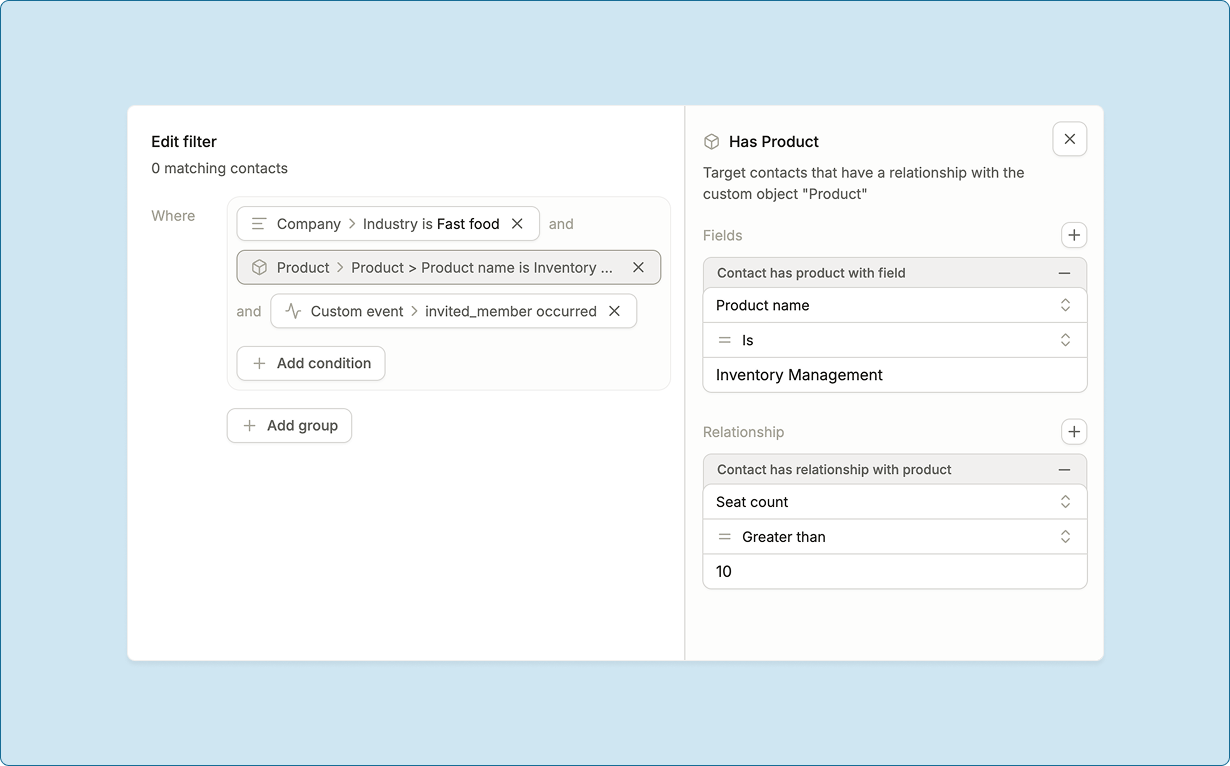
- Syncing in table records as custom objects and then tying contacts & accounts to those objects as relationships. These custom objects can be used to create powerful segments and triggers with our Unified Statement Query Engine
- Ex. A “Products” custom object that ties contacts & accounts to a specific product. Relationship attributes for contacts include role (User, Admin), last login date, etc. Relationship attributes for companies include Seat Count, Billing Tier, Renewal Date.
- Example audience trigger: Target all contacts who are an Admin using the “CRM” product where Company Seat Count > 5
- Ex. A “Products” custom object that ties contacts & accounts to a specific product. Relationship attributes for contacts include role (User, Admin), last login date, etc. Relationship attributes for companies include Seat Count, Billing Tier, Renewal Date.
Going beyond a 1:1 field mapping and supporting complex objects means that there needs to be a custom way to transform data within Conversion. Conversion has a built-in AI SQL editor which allows you to manipulate the data in your warehouse before you bring it into Conversion via contacts, custom objects, events, etc.
Why is this important? Imagine you wanted to bring in a custom field into HubSpot but the table you chose in Snowflake didn’t have it. You would have to ping your not-so-friendly neighborhood data engineer (who has a backlog of tasks, none of which are related to MarOps). They would have to go into the database, manipulate the data to your liking, and ping you when complete. At a large enterprise, this process can take up to a week – just for 1 field. Now, imagine doing this every time you want to build an automation.
The Conversion AI SQL editor gives non-technical marketers the ability to write natural language queries to manipulate warehouse data and build custom fields, objects, and events.
Imagine you had a table with millions of raw product events such as invited_teammate and project_created. Maybe you don’t want to trigger emails every time a teammate is invited but only when they’ve invited > 3 teammates. You can easily query in natural language “Create a separate event for when a company invites more than 3 teammates using the invited_teammate row”. The editor will write the SQL for you and create your event, like magic!
Summary
The HubSpot + Snowflake sync provides a rudimentary basis for mapping existing fields 1:1 from a specific Snowflake column to a field on a HubSpot object. This has extreme limitations when it comes to powering complex marketing automation campaigns centered around product activity, usage, and other warehouse objects.
The Conversion sync allows you to manipulate your Snowflake data using AI to craft custom tables, fields, and columns within your Snowflake instance. This eliminates the data engineering bottleneck of continuous pinging other teams for support and new column or field creation.
Using your manipulated data, you can create complex data objects and relationships within Conversion which allow for powerful automation and personalization. You can create custom object records and tie contacts/companies to these objects as relationships, create custom events which hold custom properties, and create/update contacts.
More from the Wayfinder

Turn Every Form Fill-Out Into Your Next Customer
Trigger personalized emails and actions based on real-time behavior, not static lists.

.png)