Build on-brand emails from blocks and your data.
Your theme styles every block, and contact, company, and opportunity fields drop into any line of copy.
Know when revenue data breaks
Monitors watch every sync and model, flag a late or failed run the moment it happens, and point you to the job to rerun.
Turn on MonitorsFreshness checks
Flags a late sync before anyone sees stale numbers.
Volume drift
Catches a model that loads half its usual rows.
Alerts in Slack
Each alert links to the run, so the fix is one click.
Our Stripe sync failed at 2 a.m. Monitors had it in Slack before the board deck went out.
Lavender Data, Inc. · San Francisco, CA
You're receiving this because your team uses Lavender Data. Unsubscribe
Settings
Theme
Page
Content
Header
Footer
Drag, drop, send
A modern email editor with content blocks that snap into responsive layouts. Text, images, buttons, columns, dividers, and dynamic blocks. Build emails visually without touching code.
Summit
2026
Date
Nov 12, 2026
City
San Francisco
go.lavenderdata.ai/summit
You're invited
Where data and revenue teams plan 2027
One day in San Francisco with talks, hands-on labs, and a first look at what's next in Lavender Data.
9:30 Keynote: the state of revenue data
11:00 Hands-on labs with the Lavender Data team
2:00 A first look at what's next
4:30 Closing reception
Seats are limited
Register by October 30 to hold your seat and pick your labs.
Emails that know your buyer
Pull live data from your CRM, warehouse, and product into every send. Generate personalized blocks per recipient based on their full customer context.
Product update
What's new in Lavender Data
We shipped four things your team has been asking for. Here's what changed in Lavender Data this month.
Monitors
Get an alert the moment a sync runs late
or a model fails, with the job to rerun.
Column-level lineage
Trace any number on a
dashboard back to the table and column it came from.
Faster Salesforce syncs
Incremental syncs now pick
up changed records in minutes instead of hours.
Shared metric definitions
Define ARR, pipeline,
and win rate once, and every dashboard uses the same math.
On-brand, every time
Define your brand kit once: colors, fonts, logos, and reusable sections. Lock what matters at the org level and give marketers creative freedom within guardrails. Every email ships on-brand.
Know what moves the needle
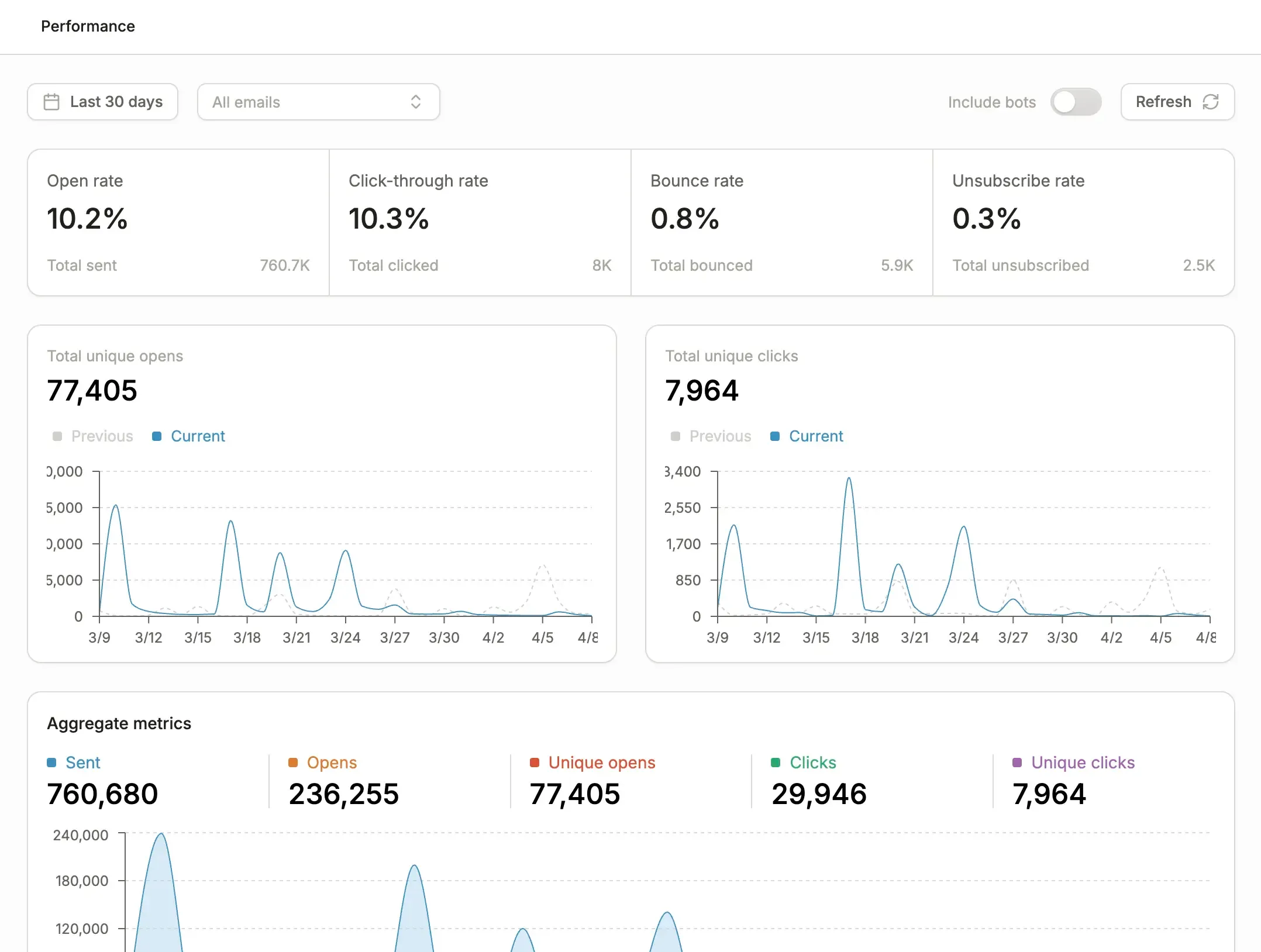
Every email and campaign comes with built-in performance metrics so you always know what's working. And because Conversion lives on your CRM data, you can tie engagement directly back to pipeline and revenue.
Everything you need to send
Enterprise email infrastructure built for marketing teams who need speed, control, and attribution.
Responsive by Default
Every email renders perfectly across desktop, mobile, and every major email client. No manual testing required.
Scheduled Sending
Queue emails for a specific date and time, or schedule recurring sends tied to workflow triggers.
Preview Per-Contact
See exactly what each recipient will receive with live CRM and warehouse data rendered inline before you send.
Deliverability Safeguards
Bounce tracking, inbox placement monitoring, automated list hygiene, and built-in protections to keep your sender reputation clean.
HTML & Liquid Support
Drop into raw HTML or Liquid templating when you need full control. Full access to your data model inside templates.
Performance Dashboard
Per-email and per-campaign metrics with pipeline and revenue attribution. Know what's driving engagement and what's driving deals.
Communication Limits
Set frequency caps so contacts never get over-messaged. Flag operational emails to bypass limits when it matters.
Event-Driven Sends
Trigger emails from CRM changes, warehouse queries, product events, form fills, or API calls in real time.
Template Library
Start from proven templates or save your own. Share across teams with version history and rollback.
Common questions
Everything you need to know about email in Conversion.
Every field in your CRM, warehouse, and product data is available as a merge variable inside the editor. Insert them inline, use them in conditional blocks to show or hide content, or let AI generate personalized copy per recipient. No engineering required to access any data source.
You can paste raw HTML directly into the editor and work with it as-is, with full Liquid templating support. For teams migrating from another platform, our deployment strategists provide white-glove migration to get you up and running fast.
Conversion follows industry best practices: dedicated IP warming, proper domain authentication, bounce handling, and automated list hygiene. You get visibility into inbox placement rates, bounce categories, and spam complaints so you can catch issues early.
Yes. Select any contact and see exactly what they would receive with their actual CRM and warehouse fields rendered inline. Catch personalization issues before you hit send, not after.
Conversion campaigns sync natively with Salesforce campaigns, including membership and status updates. Use any Salesforce field in your emails, and track campaign-driven pipeline without leaving your existing reporting workflows.
Every email and campaign has a built-in performance dashboard with opens, clicks, and engagement metrics. Because Conversion tracks activity through your site and captures form fills, you can follow the thread from email open through to meeting booked and pipeline created.
See the email studio in action
Book a demo to see how Conversion helps you build, personalize, and measure email campaigns that drive pipeline.