Move up from HubSpot without a lost quarter
Agents rebuild your workflows, lists, and campaigns in Conversion with the Salesforce-native sync HubSpot never had. Your strategist QAs everything while HubSpot keeps sending. Average timeline: four weeks.
Trusted by teams that made the switch












4 wk
Average migration timeline
1-2 hr
Per week from your team
0
Gap in campaign execution
Your HubSpot vocabulary, mapped
HubSpot made your team fast, and the ceiling is why you're here. Everything your team knows maps over, and the Salesforce side finally works the way it should.
Workflows
The same visual building experience, with nested branching and triggers from CRM changes, warehouse data, and product events.
Segments & lists
Rebuilt in a visual statement builder that reaches CRM, warehouse, and product data.
Objects & fields
A relational data model with first-class custom objects instead of a fixed contact-company-deal schema.
Liquid templating
Conditional blocks, loops, and live CRM and warehouse fields in every email.
Campaigns
With native bidirectional Salesforce Campaign sync and member statuses, so marketing touches show up in pipeline reporting.
Scoring models
Rules-based scoring plus AI agents that score using warehouse and product signals.
Native warehouse sync
Snowflake, BigQuery, Databricks, and Redshift connections included, with no Enterprise-tier add-on.
What agents do with your HubSpot instance
HubSpot instances sprawl: lists that reference lists, workflows cloned and tweaked for years. Agents untangle it, and your strategist decides what deserves to move.
Meet the agentsMap every workflow
Agents trace enrollment triggers, branches, and actions across your portal and translate each workflow for your strategist to QA.
Untangle lists and properties
List dependencies and custom properties are inventoried, deduplicated, and rebuilt as segments on a relational data model.
Stand up real Salesforce sync
Agents propose field mappings and sync rules from your existing setup. Your strategist validates them against live Salesforce records before anything switches.
HubSpot stays live for the entire migration. Every component is QA'd before anything switches, and you decide when the migration is finished.
Your HubSpot build, rebuilt in a single prompt
We opened the chat, asked for this workflow to be rebuilt in Conversion, and this is what came back. Same enrollment logic, with the branching depth and Salesforce Campaign sync HubSpot could not reach.
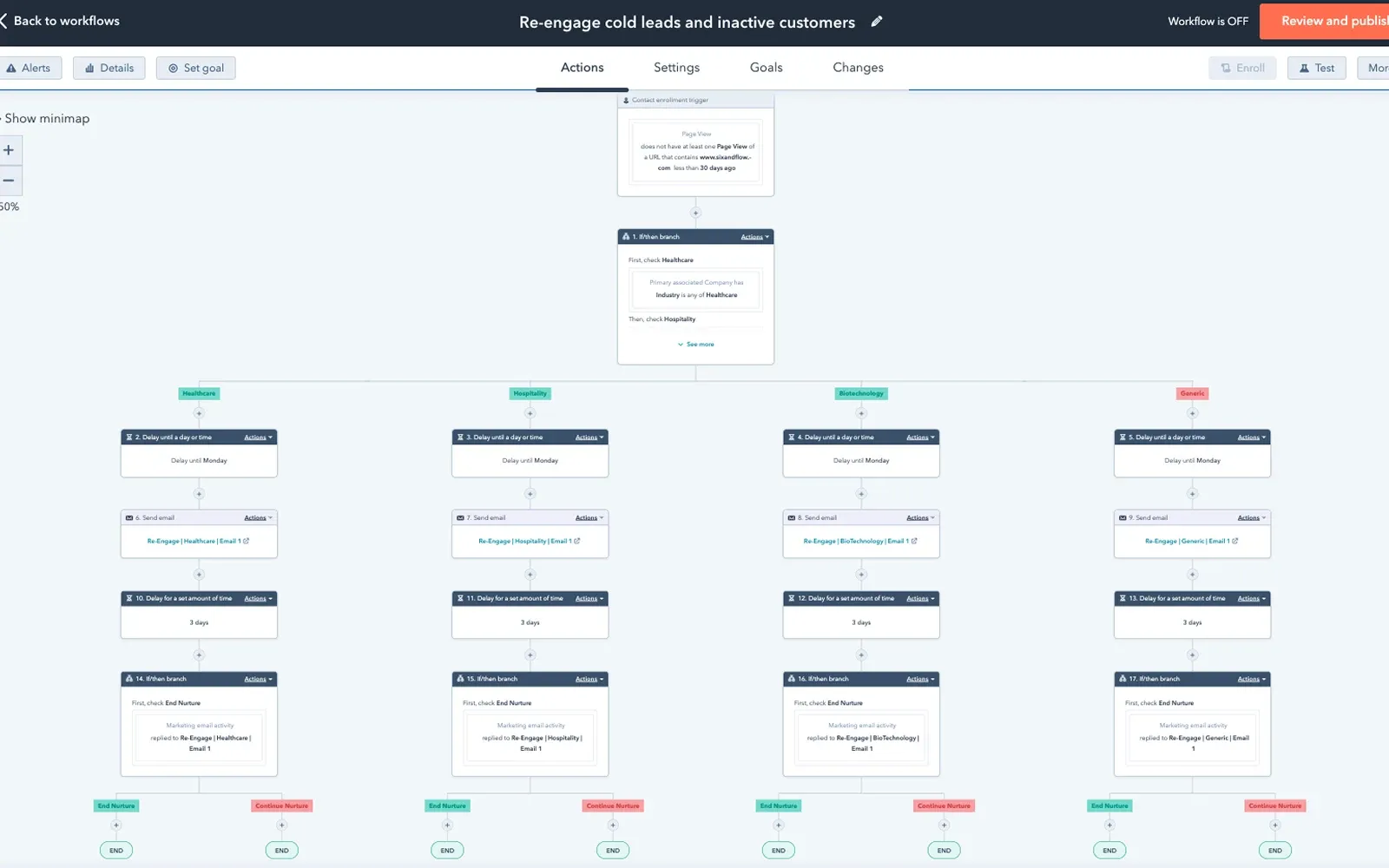
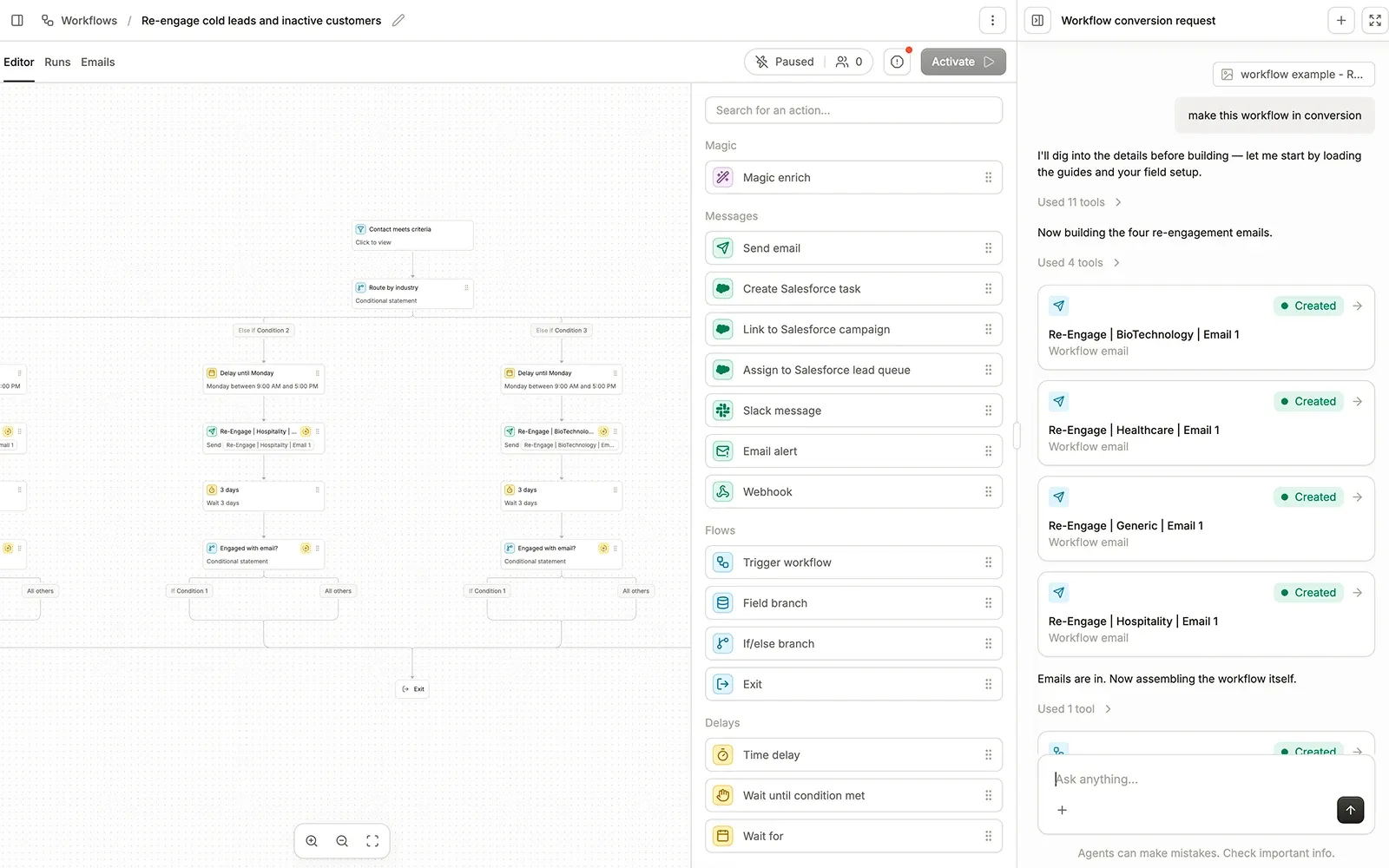
Multiply that by every program in your instance and you have the migration. Agents do the rebuilding, your strategist QAs each component, and HubSpot keeps sending until the migration is finished.
Five phases, zero downtime
The same five phases run on every migration. Agents compress the audit and rebuild from months to days, and your strategist owns the plan, the QA, and the switch itself.
Discovery & Audit
Agents crawl your current platform and map every program, scoring model, email template, integration, and routing rule in days. Your strategist reviews the map with you and flags what to rebuild, consolidate, or retire.
Migration Planning
Together, you build a phased plan with clear milestones. Your team keeps running campaigns in your current platform throughout the transition.
Data Migration & CRM Sync
Contact records, custom fields, and list structures move over with agent-run validation at every step. Salesforce sync is configured and tested alongside your existing platform before anything switches.
Program Rebuild & Testing
Agents rebuild your workflows, nurture programs, and scoring models in Conversion. Your strategist tests every component end to end against live data and signs off before it ships.
Go-Live & Optimization
Your strategist stays embedded with your team after you go live. They monitor deliverability, optimize workflows, and make sure adoption sticks.
Common questions
Everything you need to know about moving from HubSpot to Conversion.
Yes. Conversion's workflow builder supports the same visual patterns your team uses in HubSpot, plus nested branching and triggers from Salesforce changes, warehouse data, and product events. Agents translate each workflow and your strategist tests it end to end before it goes live.
Lists are rebuilt as segments in a visual statement builder, and properties become fields on a relational data model with first-class custom objects. Where HubSpot forced flat properties, your data can keep its actual structure: accounts, opportunities, product usage, and custom entities with real relationships.
This is usually the reason teams switch. Conversion syncs bidirectionally with Salesforce Campaigns, including member statuses, so marketing touches tie directly to pipeline and revenue in the reporting your leadership already uses.
No. Design-first craft is one of the things customers consistently call out. Emails are drag-and-drop with Liquid available when you want power, segments build visually, and teams evaluating both platforms tell us Conversion is more capable without being harder to live in.
The average is about four weeks. HubSpot stays live for the whole parallel run, your team spends 1 to 2 hours a week reviewing and approving, and you decide when the migration is finished.
Outgrown HubSpot?
Talk to our team about an agent-run HubSpot migration. Your portal stays live until every workflow is rebuilt, tested, and approved.