Send as the contact's owner, and CC your team
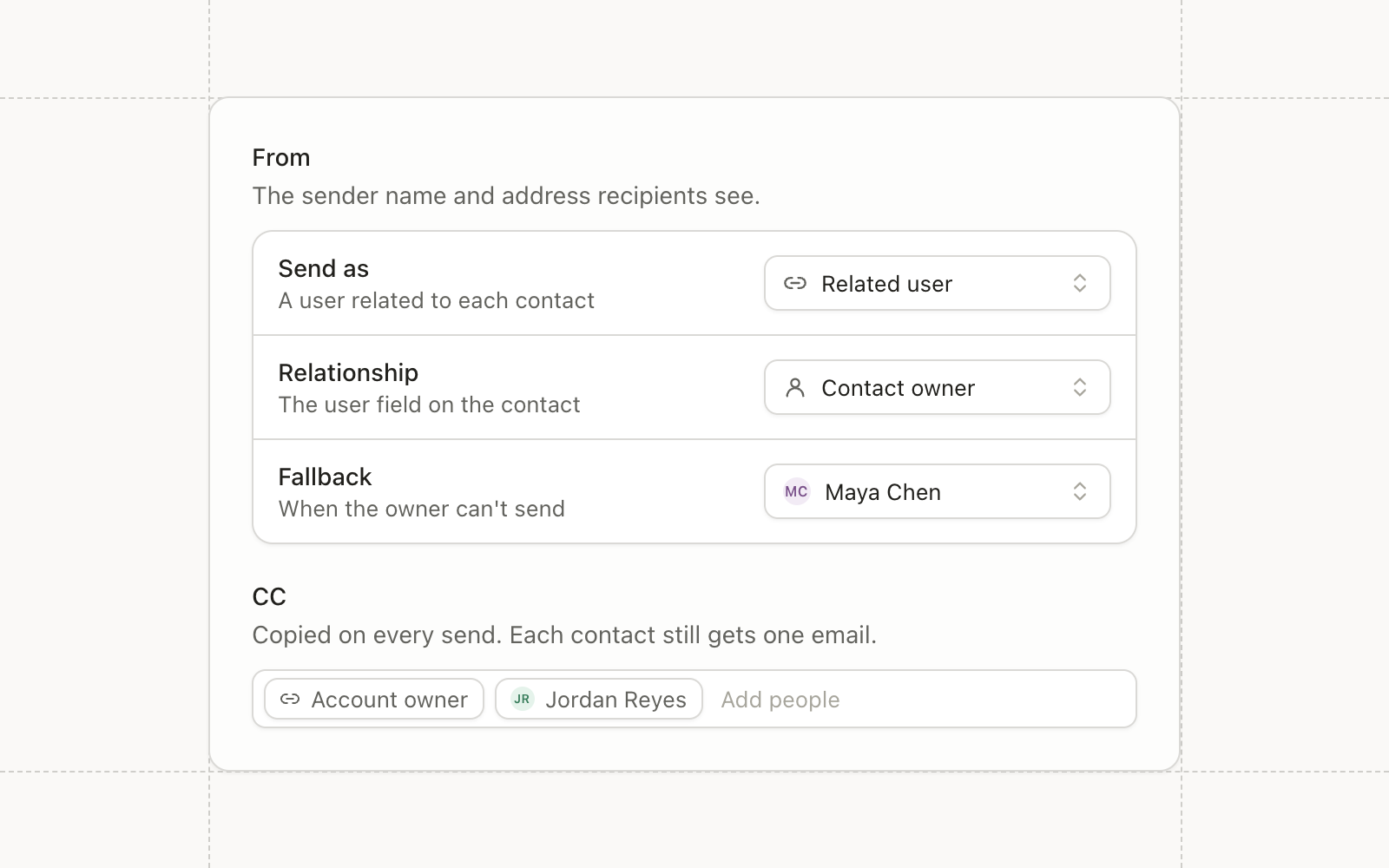
Blasts and workflow emails can send from a User in your CRM now. From and Reply to each offer three choices: a configured sender address, a specific User, or the contact’s own user through a relationship like Owner.
When the contact’s user can’t be used, such as a queue or an inactive User, the email falls back to a sender or User you
choose. The preview shows the From and Reply to a live send would use for any contact you select, and why a User was
skipped. Publishing stops a From whose domain isn’t connected, so a sender that could never deliver is caught before
anything goes out. The sending User is available in Liquid as sender, so the signature can carry the rep’s name.
CC your team on each send
Blasts and workflow emails can copy workspace members, specific Users, or the contact’s user, with the same fallbacks. Each contact still gets one message, with them in To and your team in CC. An address that can’t be used is skipped without blocking the send, a bounce from a CC address never changes the contact’s status, and test sends never CC anyone.
Workflow email alerts reach CRM Users the same way: the contact’s user with a fallback, or a specific User.
Wistia webinars
Wistia joins Sequel.io, Goldcast, and Zoom as a webinar provider. Connect it from settings with an API token, then bind a Conversion webinar to a Wistia webinar. Members moved to Registered, by hand or by a workflow, are registered on Wistia and get their personal join link. Sign-ups on Wistia’s own page come in daily, and attendance syncs within about an hour and a half of the session ending, with watch time on each attendee.
Picklist fields
Picklist is a new field type with a defined list of options. Create one, reorder or deactivate options, or convert an existing text field. Link a picklist to a Salesforce picklist and its options stay in sync with Salesforce, and filters on it offer the options directly instead of a free-text box.
Warehouse sync drafts and versions
Warehouse syncs have drafts. Edit a sync, publish when it’s ready, and look back through every published version, so a half-finished change never touches the sync that’s running.
Improvements
- Automations The Update topic subscription node subscribes or unsubscribes a contact from specific topics without touching their overall subscription status.
- Email Magic blocks can pick content with ordered filter conditions. Each contact gets the first variant they match, and any variant can hide the block.
- Email Turning on the Operational setting asks for confirmation, since operational emails skip communication limits and reach unsubscribed contacts.
- Email Recipient exports appear in Settings with your other exports, with a Not Sent Reason column.
- Audiences Filter counts reflect the list you’re narrowing, so an audience members table reads “312 of 4,210 members” and a workflow branch counts the contacts on its path.
- Audiences Custom event data can be filtered in audiences as well as workflow triggers, and text comparisons ignore case in both.
- Campaigns A campaign status can carry several meanings, blasts get their own status meanings, and custom campaigns open on an Overview tab with their details, Salesforce connection, and recent assets.
- Data Model Relationship fields are available in every workspace, including relationships from contacts, companies, and opportunities to Users and Groups.
- CRM Sync The sync overview shows exact counts of what would sync before you turn an object on.
- Reporting The attribution overview shows top tables by goal date or touch date.
- Agents Chat defaults to a higher reasoning effort.
Fixes
- CRM Sync When several contacts share an email, form fills and other lookups use the Salesforce-linked contact instead of an unlinked duplicate.
- CRM Sync New contacts link to an existing Salesforce Account even when its website is stored with www or https.
- Integrations Zoom Events webinars appear in the bind picker for accounts that only use Zoom Events.
- Campaigns Duplicating a campaign that contains a trashed folder no longer fails.
- Agents Large images no longer break agent chat history.