Agents that ask, and chat history in the sidebar
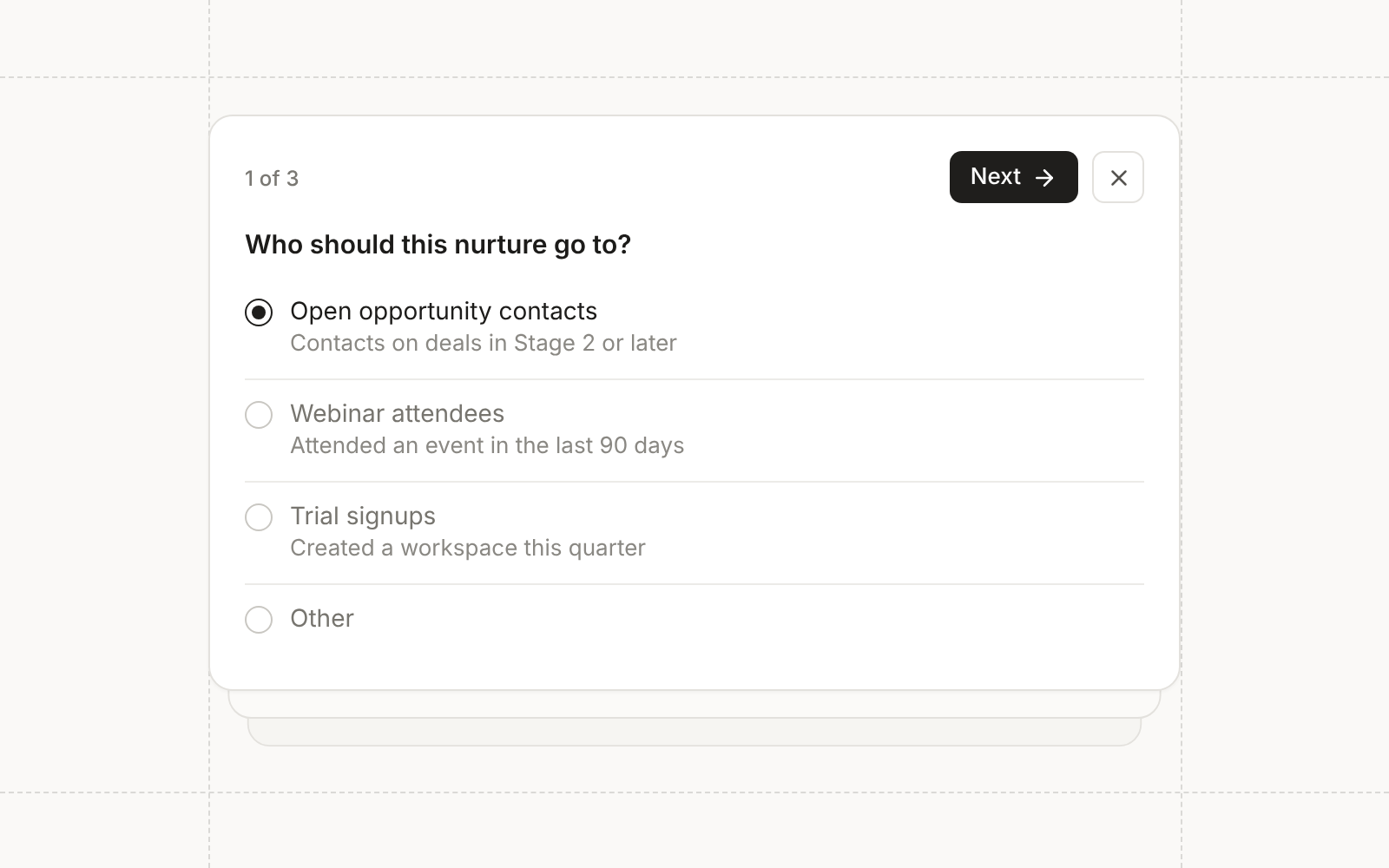
Interactive agents can now stop and ask before they act. When a request leaves a real decision open, the agent pauses its turn and shows up to three related questions inline in the chat. Each question can be single choice, multiple choice, or free text, and Other lets you type your own answer. Continue submits what you’ve answered and lets the agent decide anything you left blank, so a skipped question never blocks the work.
Chat history in the sidebar
The agent chat sidebar has a history button that lists your recent chats with relative timestamps. Search by name to find an older conversation and switch to it without leaving the page you’re on.
Unpublish landing pages
A live landing page can be taken offline from its page menu. Its URLs stop serving, and the draft and full version history are kept, so you can publish again whenever you’re ready and pick up the version sequence where it left off. Unpublishing needs the same permission as publishing, and it’s a lighter option than archiving a page you only need down for a while.
Conditional fields on landing page forms
Forms on landing pages now follow the same conditional field logic as the form builder. A form stays hidden until the first answer, fields appear and disappear as visitors complete earlier ones, and visibility is locked at submit so nothing shifts mid-submission. The editor preview evaluates the rules too, so you can test them before publishing.
Defaults for new forms
Settings has a new Forms page with workspace defaults for new forms: create new contacts for new email addresses, subscribe contacts automatically, and sync contacts to Salesforce. New forms of every type follow these defaults, and any form can override them in its own settings. Managers can edit the defaults, and everyone else sees them read-only.
Export more through the public API
The public API has bulk exports for contact events, Conversion assets, and Mosaic touchpoints, so your warehouse can read engagement and attribution history without a custom pipeline. The Fivetran connector reads the same exports, and the email events export is now deprecated in favor of contact events.
Custom preference centers
Workspaces that manage subscriptions in their own preference center can send unsubscribe links there. Administrators
turn on Preference center under Email configuration and enter an HTTPS URL. The unsubscribe block and the
{{ unsubscribe_link }} token then point to that page on future sends, and turning the setting off restores
Conversion’s hosted link.
The URL can use Liquid with contact and company fields, tokens, conditionals, and details of the email being sent, such as its topic, so your page opens on the right person and subscription. Conversion validates the URL when you save it and keeps your query parameters exactly as written, without adding UTMs or click tracking. A link that renders as an invalid URL stops that send instead of falling back to the hosted page. Changes people make on your page come back through your synced fields, such as Salesforce, and don’t count toward a single email’s unsubscribe reporting.
Workspace token defaults
The Workspace page has a Tokens tab for default token values. An asset uses the value from its nearest folder or campaign that sets the token, then falls back to the workspace default, so a value every campaign shares only needs to be set once. Agents can set defaults too, subject to the approval you require for that tool.
Improvements
- Agents Chat shows a card for landing pages, landing page themes, lead gen forms, duplicated workflows, new agents, and lead score models the agent creates, linking straight to the new asset.
- Agents Agents can sync contact imports into Salesforce on their own, still subject to the approval you require for that tool.
- Agents Agents can look up email senders and sending domains, and add a sender for a connected domain.
- Email Scheduling a blast checks that it is ready to send, and once sending starts a blast can only be renamed.
- Automations Workflows triggered by Meta and LinkedIn lead gen forms can read the lead ID and the campaign, ad set, and ad the lead came from in Liquid, along with LinkedIn form hidden fields.
- Data Model The fields list sorts by label, key, or fill rate, and field dialogs say Key instead of Name.
- CRM Sync Contact, company, opportunity, and Salesforce-linked custom object record menus have a View sync logs option that opens the sync history for that record.
- CRM Sync Optional default Salesforce field mappings, such as Campaign Name, can be linked to other Conversion fields. Required mappings like Email stay locked.
- CRM Sync While a sync is running, its status pill reads Running instead of showing the time since the last successful sync.
- API Batch contact upserts accept a userId, so integrations can match and update contacts by their own IDs, even without an email.
- Admin Cloning or duplicating an asset lets you choose the destination folder.
- Admin Asset headers show the full folder path.
Fixes
- Agents The agent writes Liquid in the Liquid editor instead of pasting it into the message.
- Email Campaign member fields in Liquid resolve in emails inside webinars and field events instead of using their fallbacks.
- Campaigns A new Salesforce campaign created for a webinar is named after the webinar’s name in Conversion, not the provider’s event title.
- Integrations A Webflow sync that stalled no longer gets stuck.
- Integrations Contacts created from Zoom and Sequel registrations get the registrant’s first and last name.
- Integrations Sequel registrations keep syncing more than 90 days after connecting.
- Integrations Wistia webinars sync with the correct start time and duration. Use Re-sync on webinars bound before this fix to correct them.